


Google Scholar is a convenient bibliographic service that allows quickly finding necessary information and popularizing the work of a researcher. In this article, we will thoroughly examine why it is worth paying attention to Google's product and what its key characteristics are.
"Google Academy" or Google Scholar, unlike more extensive bibliographic platforms such as Scopus and WoS, is a more accessible web service with metadata indexing of scientific literature. The academic version of Google was released in a trial version back in 2004 and since then has included peer-reviewed online journals, conference proceedings, documents, articles, books, abstracts, and reports, thus encompassing a vast amount of research material. Using a regular Google search does not yield similar results, as Google Scholar searches specifically within the repositories of publishers, universities, scientific websites, and therefore has more relevant access to scientific sources. Google Scholar also has a number of internal advantages, such as:
-
Ability to copy formatted citations in various styles;
-
Exporting bibliographic data (BibTeX, RIS);
-
Exploring other works using citation.
Google Scholar is not a bibliometric database that can be fully compared to Scopus and WoS; the difference lies in its more simplified user access. This concerns not only the graphical perception (interface) of the database, which is undoubtedly an advantage of the platform, but also the peer review of research. Scopus and WoS are the most comprehensive platforms, the indexed publications of which set strict standards for published materials, whereas the review process in Google Scholar is automatic and does not involve a human factor. This can be both an advantage, as it allows for the publication of more materials that meet academic standards but may not be considered by these bibliometric databases, and a disadvantage, as Google Scholar often contains materials that lack scientific value.
Key features of Google Scholar:
-
Only researchers who already have articles can register on the platform. If an author does not have available works, they will not be able to complete the registration process. The author must provide their contact information and manually add their works. Immediately after this, the researcher receives a Google Scholar ID and additional bibliometric indicators.
-
The system uses not only English but also national languages, allowing materials to be added in the original languages.
3. A distinctive feature of Google Scholar is its corporate approach to adding materials. If an author does not specify the scientific organization they represent, queries in the search bar will not be displayed correctly (the search system will not retrieve them).
Common parameters for Scopus, WoS, and Google Scholar include various search types, material analytics, the use of the I10 index and the Hirsch index, as well as extensive publication selection capabilities.
The I10 index, known as the Google Scholar index, reflects the number of publications that have at least 10 bibliographic references. The Hirsch index determines the author's citation impact, a metric important for the academic recognition of the researcher. A high Hirsch index allows a researcher to integrate into the community of the most recognized scholars.
An expert's research can be considered successful if it receives citations and attracts the attention of as many interested individuals in the scientific community as possible. Through this indicator, the author can assess the effectiveness of their work and make necessary adjustments, check the formatting correctness of the work, and its substantive content. To improve the citation rate, it is recommended to work on the relevance and novelty of the article, choose a relevant publication, and pay attention to the correctness of the work's metadata. However, Google Scholar has certain drawbacks in terms of indicators. The resource lacks a clear method for counting and verifying citations, as it includes self-citations in the calculation, for example.
Pros and Cons of Google Scholar:
Pros:
-
Free resource;
-
Most progressive platform;
-
Ability to manually add works (absence of waiting factor);
-
Can be used as a bibliographic manager;
-
Library connection setup (if you are an educational institution employee);
-
Supports regional languages;
-
Can be integrated with other resources such as EndNote;
-
Indexing of hard-to-access sources: preprints, open-access journals, etc.
Cons:
-
Limited depth of analysis;
-
Low level of content moderation;
-
Google Scholar lacks special plugins and integration with Word;
-
Limited information as it mainly relies on metadata provided by researchers;
-
Doesn't always include links to the full text.
Among the drawbacks, it is necessary to highlight the lack of a clear ethical policy for using the resource, as it is easy to violate copyright, as well as the absence of the possibility to contact user support (Google Scholar does not have a feedback system). Another drawback is the lack of quality control for posted works. The platform's mechanism does not involve tracking quality and updates.
How to sign in to Google Scholar?
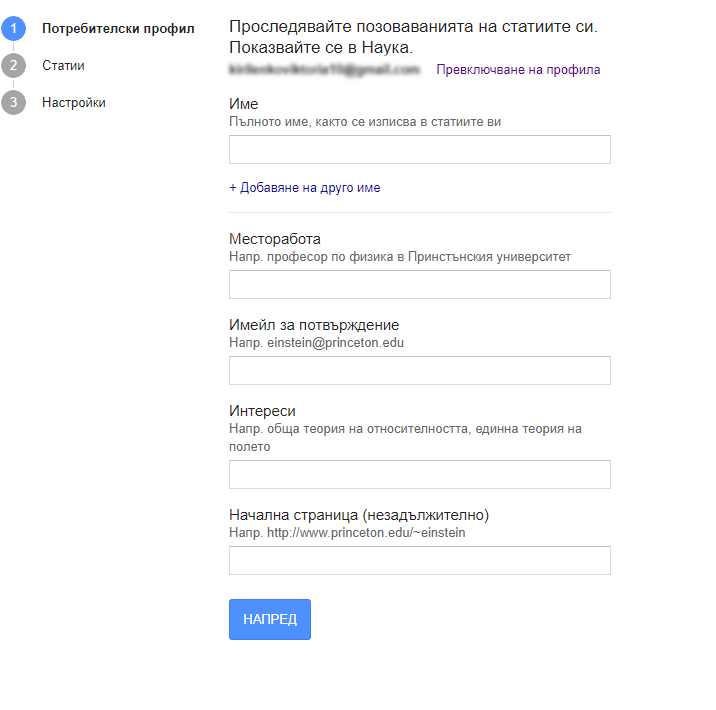
We work with the "My profile" tab.
-
Register on the platform and log in to the system;
-
Add necessary information about yourself;
-
Specify the full name according to the name indicated in publications;
-
Add a variant of name spelling;
-
Fill in the affiliation field;
-
Provide an email address;
-
Specify scientific interests;
-
Add the website of the scientific organization or educational institution;
-
Add articles to the profile using the search for all materials by name (materials are displayed in the form of groups or individual publications);
-
Adjust notifications and profile visibility.
Why should a researcher use Google Scholar?
-
For searching scientific literature on various thematic directions;
-
For tracking their indicators and data control;
-
For systematizing their research;
-
As a bibliographic manager.
How to use Google Scholar?

Google Scholar is an extremely user-friendly platform that does not require additional skills, such as working with databases.
The first step to successful use of the service is to go to the Google Scholar page and enter a keyword query. After that, the user is provided with a page with the most cited records, so they can familiarize themselves with them and choose the most relevant source for their query.
-
The document title is displayed;
-
Bibliographic information about the document: author, journal, year, publisher;
-
Clicking on the title opens the publisher's page with information about the document;
At this stage, attention should be paid to additional filters that optimize the platform's operation. Among them are filters for search queries with various functional capabilities (selecting the year, type of material, etc.), a panel of all results, links for quick download of the work, and related sources.
Under the publication title, there is a clickable link to the researcher's name, a "Save" option, a "Cite" option for adapting to citation formats, familiarity with the list of materials citing the work ("Cited by"), and viewing additional versions of the search query ("All versions").
The system provides such citation styles as APA, MLA, Vancouver, Chicago, Harvard;
On the left panel, there is an "Advanced Search" for searching by keywords, author, publication, individual word from the list, etc. The "My library" tab is necessary for displaying saved search queries, creating separate lists, filtering by publication date, moving materials to folders (Labels), deleting materials, editing information about materials, and exporting them.
One of the services offered by "Scientific Publications" is increasing the Hirsch index in Google Scholar. This metric contributes to enhancing the author's authority and determining their status as a researcher. The H-index helps identify relevant topics in various fields, assess the value of work, and compete for grant support. Additionally, we offer comprehensive work with your profile, including creating your profile, adding articles that are temporarily missing (we search for your works and manually add them to your profile), as well as the opportunity to find collaborative work. Contact us now to start leveraging all the benefits of Google Scholar and take your scientific achievements to the next level!


