Google Scholar is a handy tool for scholars to easily and quickly track their publications and their citations. Google Scholar is a global database that includes a huge amount of scientific literature and citations. Given the scale of the platform, sometimes errors occur, such as incorrect display of publication citations in the author's profile. This limits the visibility of a scientist's publications and, consequently, hinders the increase of his/her Hirsch index. In this article, we will analyze a specific example of correcting errors related to incorrect display of citations in Google Scholar.
Incorrect display of article citations in Google Scholar. Why does this happen?
The success of a scientist's career is influenced not only by the active publication of articles, but also by their relevance in the scientific environment. One of the important aspects is the monitoring of citation and other scientometric indicators. For this purpose, it is important to regularly check the relevance of data and key indicators in the author's profile on the Google Scholar platform to make sure that the scientific contribution is accurately reflected and recognized among colleagues.
Sometimes authors face a situation when an article in Google Scholar is present in their profile, but citations are counted not for the paper itself, but for one of its citations.
Why do such errors occur?
- automatic indexing errors
- metadata problems
- technical limitations of the platform.
How can the situation be corrected? Let's look at a concrete example.
Here is an example of a random article from Google Scholar, where citations are not displayed in the author's profile.

In the Google Scholar search, you must enter the name of the article for which no citations are displayed. On the left side of the panel, select the "include citations" function.
We will see two results in the output:
- an active link to the full text of a PDF article published in a scientific publication
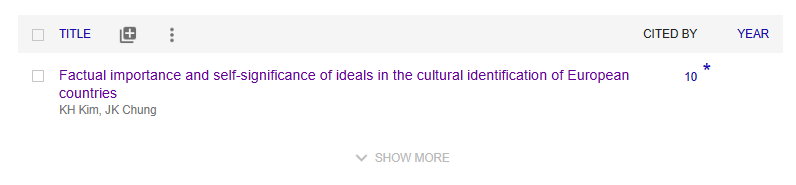
- a separate entry citing the article without an active link that reflects that the article has already been cited 10 times in other studies.
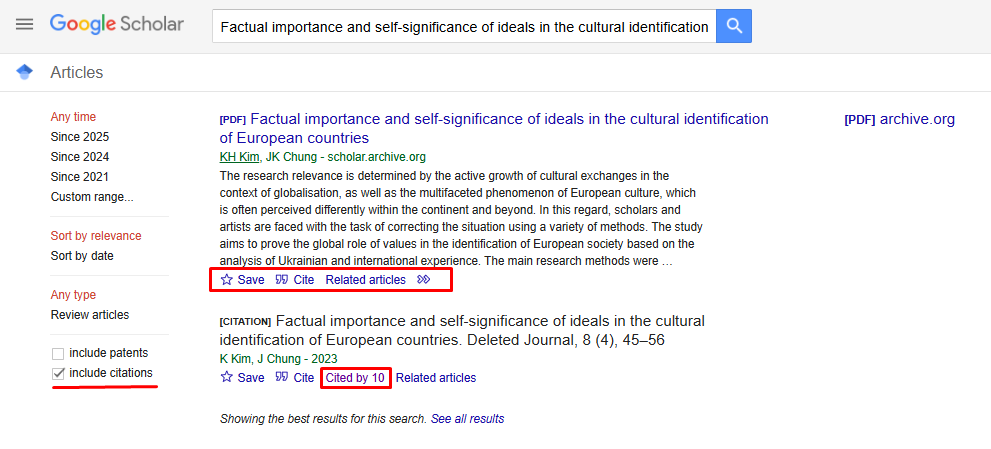
Even though both results refer to the same article, the platform incorrectly merges the data, causing the citations to be unlinked to the main publication record and counted as one of the citations. As a result, the system erroneously shows that the article has no citations. How can this error be resolved?
Instructions on how to merge articles with citations in Google Scholar
To merge an article and its citations into Google Scholar, follow these steps:
Step 1. Sign in to your Google Scholar account
Go to Google Scholar. Sign in to your account using your Google credentials (email and password).
Step 2. Search for an article
In your profile, select the "Add articles" button as shown in the screenshot below.
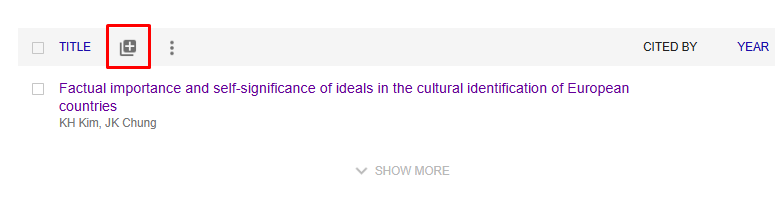
Type the title of the article in citation format into the search box. In this case: "Factual importance and self-significance of ideals in the cultural identification of European countries. Deleted Journal, 8 (4), 45-56". Select the article by checking the box next to the title. This will allow you to link another version of the article to your profile to further update the citation count of the main article.
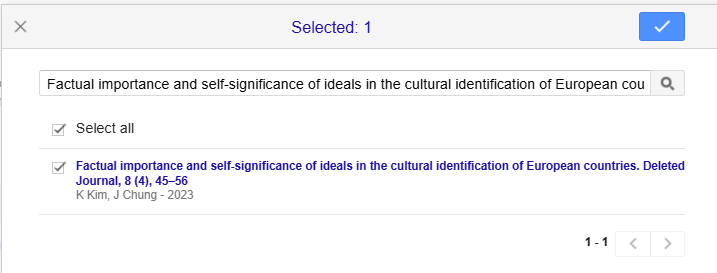
Step 3. Combine entries
Select both article records (active publication link and citations without an active link). Follow the steps below:
- check the boxes to the left of the records you want to merge
- click the Merge button in the top menu.
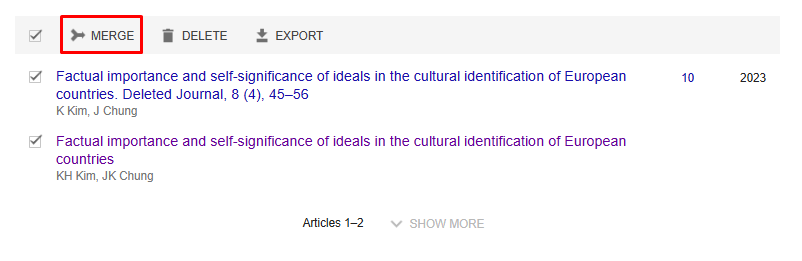
This action will merge the records into one, ensuring that citations are correctly linked to the main record of the article. As a result, the citation statistics in the profile will be updated according to the current data.
Step 4. Determining the correct version of the article
After selecting both article records, you must determine the correct version of the article and click the button to merge ("Merge").
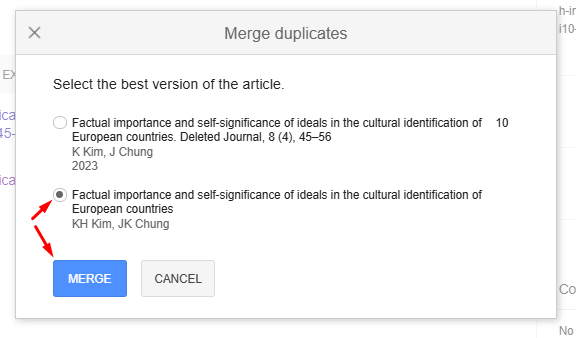
This action will combine citations and other results into a single article, ensuring that the total number of citations is displayed correctly and improving your profile on the platform.
Step 5. Check the results in your author profile
Having performed the above steps, you will get one unified article with active links to the publication and correct display of the number of citations (in this case - 10). This will provide an accurate representation of the impact of your work, allow you to conveniently track citations and correctly calculate your Hirsch index.
How to prevent such errors?
- Regularly check the metadata of your scientific publications. Make sure that the article data (DOI, authors, title, etc.) are correct.
- Systematically update your Google Scholar profile. Add new works manually if they have not been automatically indexed. Remove duplicate or incorrect entries.
- If you are having trouble optimizing your Google Scholar profile, talk to science and scientometrics professionals.
Your Google Scholar profile is a reflection of your professional success. If you need to improve your Google Scholar profile, our experts will help you to properly format your citations according to the requirements of scientific journals, customize technical parameters and organically increase your Hirsch index. You get a Google Scholar profile audit as a gift!
Leave your contact details in the form below to get a detailed consultation from our expert.