It is important for every author to have their own profile in well-known and reputable databases, such as Scopus and Web of Science. How to create a researcher profile in Scopus?

Scopus is one of the largest international scientometric databases in the world. More than 7,000 publishers are represented in Scopus, and the number of registered authors is more than 19.6 million, including more than 99.6 thousand affiliated authors, according to Scopus data as of December 2023. For authors, having a profile opens up many opportunities. The first, and most important, is that Scopus is a great source of information when writing your own research paper.
Today we will explain and demonstrate step-by-step how to create a researcher's profile in the Scopus database.
How to create a profile in Scopus?
Step 1. Create an account.
The first step to creating a researcher's profile in the Scopus database is to register on the official website.
To create a new account, click "Create account" in the upper right corner of the page.
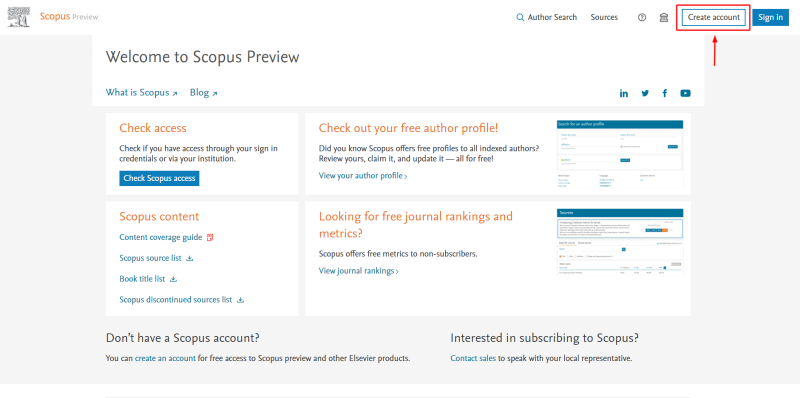

What need to be done to register?
- Enter your email address.
- Click "Continue".
- You can log in if you work for an organisation that has access. To access Elsevier content through your organisation, enter your organisation name or email address, and then select it from the list.
Step 2. Register.
After creating your account, you need to register in the Scopus system.

To register with Scopus, you need the following information:
- Email address.
- First name.
- Surname.
- Password.
- By selecting this option you will always be logged in.
- By selecting this option, you allow Elsevier to send you information about relevant products and events.
- The last step is to register.
Create a password
When you register, you need to create a strong and secure password. The system helps you with this step: if your password is of medium strength, the system will highlight it in yellow. If the password is complex and strong, which will ensure a high level of security for your account, the system will mark it in green.

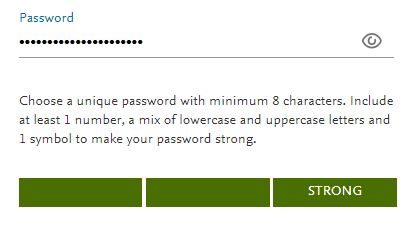
Congratulations, you have successfully created a profile in the Scopus database!

Step 3. Getting to know the functionality.
After creating an account and registering in the Scopus database system, you will see the home page.

Home page
On the home page, you can see several functional elements in the upper right corner.
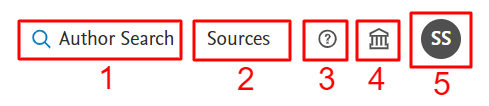
- Search for an author's profile.
- Sources.
- Help.
- Access to Scopus.
- Profile.
Help
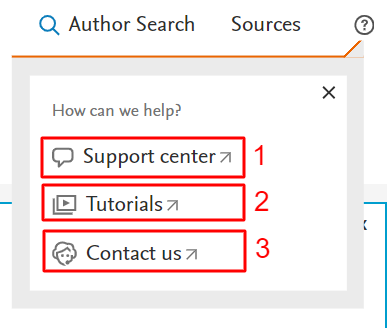
Access to Scopus

Profile

- Requests. This section displays author requests for error correction, requests for Scopus support, etc.
- Privacy centre. Here a researcher has the opportunity to set up and manage privacy.
- Elsevier account. Here you can make changes to update your author account information and configure other Elsevier products such as Mendeley and ScienceDirect. You can add multiple email addresses, change your password, and verify that your profile information is up to date and correct. You can also set up marketing preferences. Elsevier may send you information about relevant products and events. You can therefore decide here whether you wish to receive such communications.
Search for an author profile

- Author's last name.
- Author's first name.
- Affiliation.
- By selecting this function, you will get only exact matches.
- Search.
- Search by unique ORCID identifier.
Register your unique ORCID and use Scopus to import your records.

- The number of search results (matches) returned.
- Improving the search.
- The name of the source.
- Affiliation.
- City.
- Country/territory.
- Sorting the results.
You can sort the results by:
- by the number of documents;
- by the Hirsch index (h-index);
- by name (in alphabetical or reverse alphabetical order);
- by affiliation (in alphabetical or reverse alphabetical order);
- by city (in alphabetical or reverse alphabetical order);
- by country/territory (in alphabetical or reverse alphabetical order).
Alternatively, you can use the Author Feedback Wizard to check your Scopus profile.
Author feedback wizard

Here you can use the following options for searching:
1. Basic search.
2. Search by author identifier.
3. Search by ORCID identifier.
Using the main search, you can use:
4. Author's last name.
5. First name of the author.
6. Possible variants of the name used in the publication.
7. Author's affiliations.
8. The last step is the search.

- Subject area.
- Enter a specific subject area.
- Filter.
- Display options.
- Source type.
- Select/deselect all selected filters.
Subject area
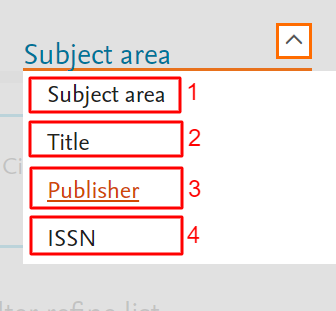
- Search by subject area.
- Search by title.
- Search by publisher.
- Search by ISSN.

- The number of results obtained during the search.
- Select all sources / select all sources on a page.
- Saving the source data in an Excel spreadsheet.
- Saving to the list of sources.
- Sort by source name in ascending/descending order.
- Download the list of references.
- Information about the Scopus bibliography.
- View the scores by year.
- Sort by CiteScore.
- Sort by percentile.
- Sort by number of citations.
- Sort by documents.
- Sort by citation percentage.
Errors in a researcher's Scopus profile
For a researcher, this is a "business card of publication activity" – a scientific passport in the research environment that helps to develop communication, obtain grants, and gain credibility.
The most common mistakes in a researcher's Scopus profile are:
- Incorrect information in the name of the organisation;
- incorrect translation, transliteration, outdated name;
- incorrect abbreviation;
- spelling mistakes;
- multiple profiles, etc.
How to correct errors in a profile?
You can correct errors using the Author Feedback Wizard. In addition to requesting edits to your author profile, you can also request corrections to your indexed publications, add publications that should be indexed in Scopus according to the content selection policy, and correct citations, for example, when an existing citation is not displayed in your profile.
It is important for an author to have a profile in well-known databases, as this is necessary for conducting research and publishing activities. Such a profile opens up opportunities for finding inspiration when conducting research and serves as a source of information when writing scientific papers.
It is not difficult to create a profile in the Scopus database, and, as an additional advantage for users, it is free of charge. In the future, publications in Scopus will affect the author's performance, increase his or her credibility and status, and open up new opportunities for international cooperation and participation in competitions for grants or other research funding.
Do you need to publish in Scopus? Do not hesitate and contact "Scientific Publications". We guarantee publication in the Scopus database because our team consists of highly qualified specialists who have been helping scientists publish their research for 8 years. If you have any questions or need advice, leave a request on the website, and our manager will contact you within a working day. Together to new achievements!